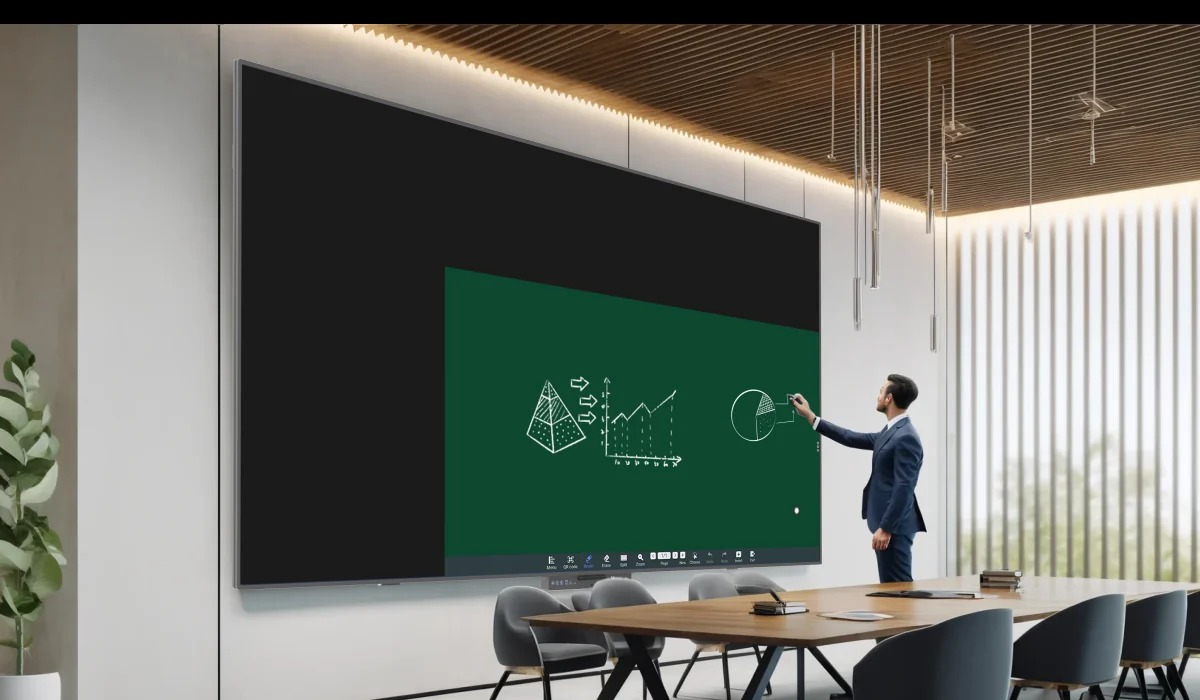
Meetings lose momentum when participants repeatedly switch among a projector, flip chart, laptop, and separate control interface. Modern conference room smart boards address that friction by combining a large visual surface with touch, writing, presentation, and software workflows, allowing participants to annotate material, compare options, share devices, and record decisions in one place.
Transformation depends on meeting practice rather than hardware presence. Sign-in, source selection, casting, writing, saving, remote participation, access control, and room reset need predictable steps. A powerful board that consumes meeting time or conflicts with managed accounts may add friction instead of collaboration.
Bringing Presentation and Participation Together
Workflow design for conference room smart boards follows a presenter opening a deck, zooming into a drawing, inviting another participant to write, locking touch during a presentation, switching operating environments, and returning to annotation. These transitions need to occur without losing content or interrupting discussion.
Collaborative whiteboarding keeps ideas visible to everyone in the room. Teams may mark plans, organize priorities, compare designs, or capture action points directly on the shared surface. Saving and distributing the result extends value beyond the meeting, provided file ownership, storage, naming, and access permissions are defined.
Wireless presentation reduces cable changes and allows several participants to contribute from their own devices. The network, casting protocol, guest access, security, latency, and user instructions determine whether this feature works reliably. A physical HDMI or other wired path remains useful for restricted networks and recovery.
Video meetings add camera framing, microphone pickup, speakers, echo control, remote-content layout, and room acoustics. Some smart boards integrate more of this equipment, while others connect external devices. Buyers need the exact included hardware and interfaces rather than assuming every all-in-one label represents the same room package.
Touch behavior shapes meeting pace. Writing tests cover pen latency, line stability, palm rejection, edge accuracy, zoom, accidental-input control, and the way annotation starts or ends determine whether participants use the board naturally. Real workshops reveal more than a scripted product demonstration.
Decision capture distinguishes collaboration from visual activity. The meeting process needs an agreed method for saving annotated files, assigning owners, sharing notes, controlling versions, and protecting confidential content. Writing on a large board creates little lasting value if the result disappears or reaches the wrong recipients.
Examining an Integrated Conference Platform
Ledman LEDHUB uses self-luminous COB Micro LED technology and is available in multiple sizes. The display platform includes eye-care functions and a touch writing board, giving meeting-room planners one surface for presentation and direct interaction while retaining size choices for different rooms.
Flexible screen zoom supports detailed review, and a one-touch input lock prevents accidental operations during presentation. This control helps a speaker keep content stable when active writing is unnecessary. Evaluators need to test how quickly touch resumes and whether annotations remain intact.
Pen-lift detection opens whiteboard or annotation applications when the magnetically attached pen is removed. That workflow reduces steps between discussion and writing, while the pen’s return position supports room reset. Procurement teams need included pen quantity, storage, replacement, and software behavior in the configuration.
The system switches between Android 13 and Windows 11. Two operating environments may support different meeting software and management requirements without replacing the display. Technology teams still need update policy, licensing, identity, security, device management, storage, and recovery procedures for each system.
NFC supports tap-to-cast connection and IC-card-based tiered access control. Integrated interfaces allow external devices to connect. These functions link ease of use with governance, although network permissions, card administration, guest workflows, supported devices, and the exact external camera or audio configuration require project definition.
Accessibility and hybrid participation require deliberate testing. Text size, contrast, mounting height, touch reach, captions, audio level, camera framing, and remote visibility affect who participates. A premium image does not automatically provide an inclusive meeting when furniture, controls, and software remain designed for one presenter.
Turning the Board Into a Business Meeting System
Room design begins with viewing distance, screen size, mounting height, glare, table position, camera sightline, speaker coverage, ports, power, network, ventilation, and service access. A board selected without furniture and remote-participant layouts may fit the wall but fail the meeting.
Pilot sessions need real agendas: opening confidential files, casting from staff and guest devices, annotating, locking touch, switching systems, starting a video meeting, saving notes, and resetting the room. Support teams record time, errors, network behavior, and user questions before a wider rollout.
Commercial scope includes the board, computing configuration, operating systems, mounts or stands, pens, cameras, microphones, speakers, cables, casting, NFC, installation, training, warranty, software support, and response targets. Missing accessories may turn a low equipment figure into an incomplete room.
A Ledman evaluation built around LEDHUB has measurable criteria in its COB Micro LED surface, multiple sizes, touch board, zoom, touch lock, pen-lift workflow, Android 13 and Windows 11 switching, NFC, and interfaces. Meeting transformation occurs when those features support faster contribution, secure access, reliable presentation, and documented follow-through.
Rollout governance helps several rooms behave consistently. Standard configurations, naming, account policies, casting instructions, reset routines, monitoring, update windows, spare pens, training, and escalation reduce local workarounds. Usage and support data then show whether collaboration features are adopted or merely present in the room specification.